How to Build a Shopify CRO Testing Roadmap
They see strong traffic but weak revenue, high add-to-cart but poor checkout completion, mobile sessions that never turn into orders, or AOV that refuses to move.
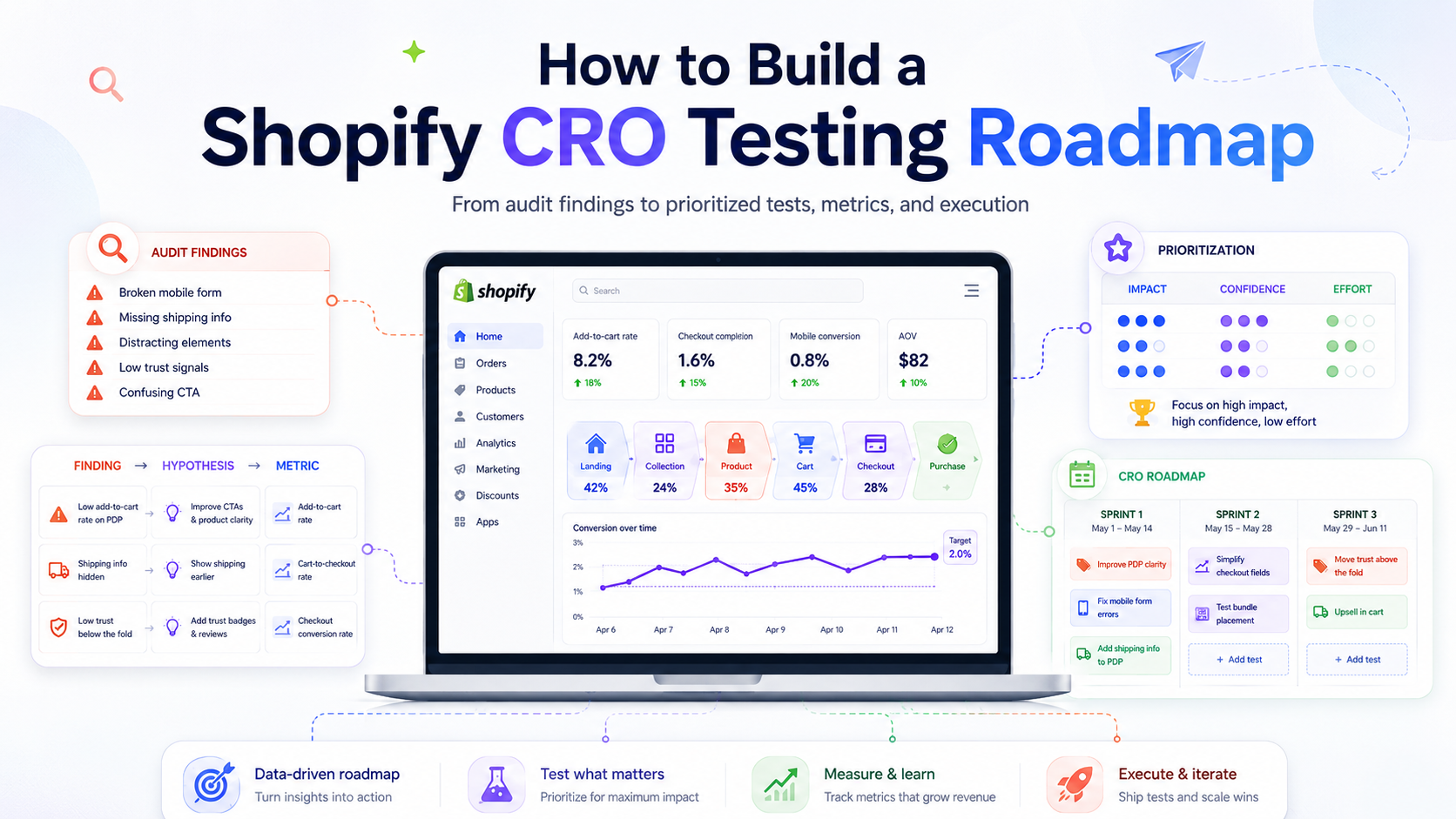
Many Shopify brands already know their store is underperforming. They see strong traffic but weak revenue, high add-to-cart but poor checkout completion, mobile sessions that never turn into orders, or AOV that refuses to move.
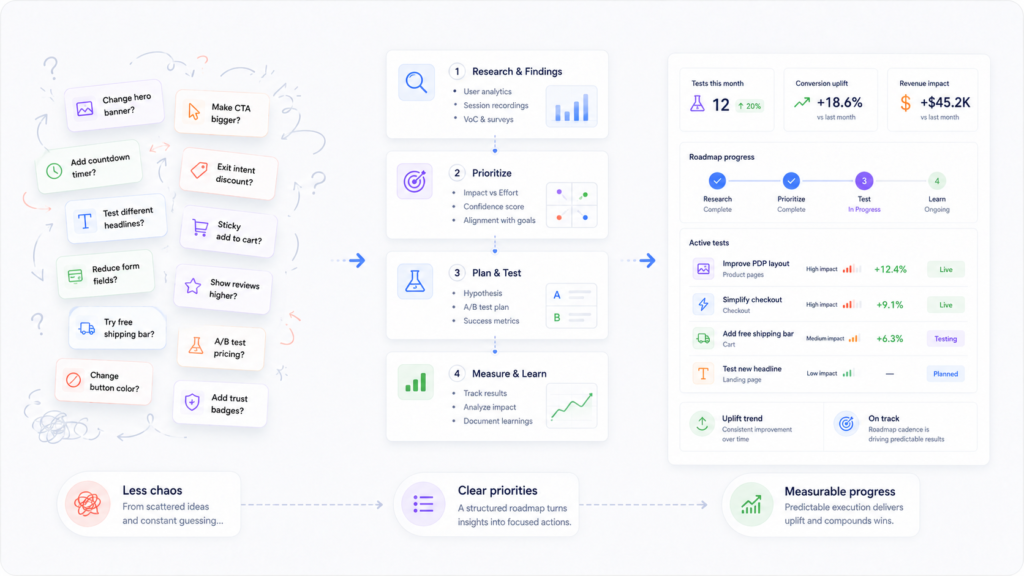
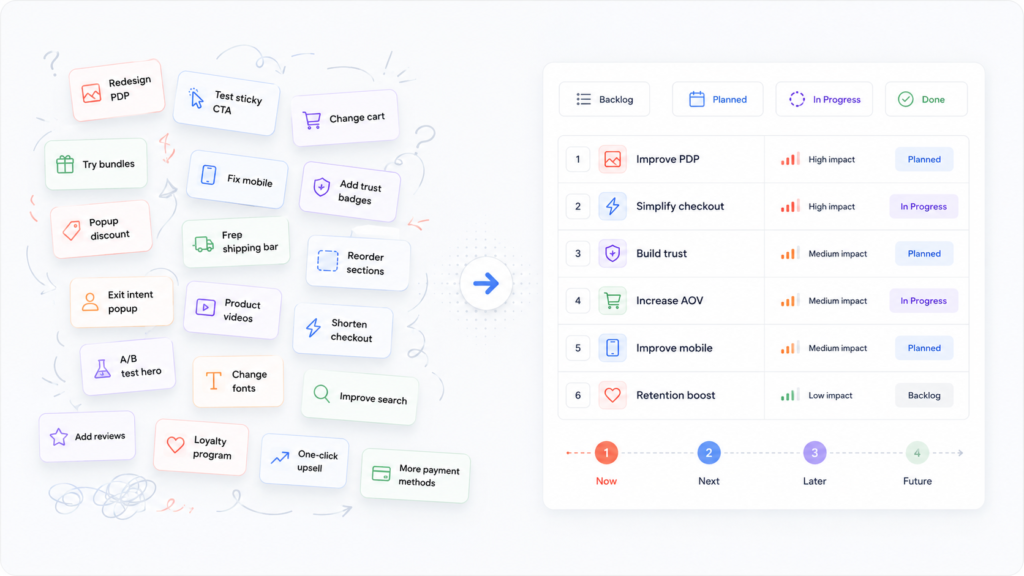
Most teams also have plenty of ideas:
- Improve product detail pages
- Test a sticky add-to-cart button
- Change the cart flow
- Try bundles and upsells
- Redesign collections
- Move trust blocks higher
- Fix mobile UX
The real problem is rarely a lack of ideas. The real problem is a lack of prioritization. Without a clear Shopify CRO testing roadmap, optimization turns into scattered changes, opinion-driven redesigns, and low-value experiments that soak up dev time without moving the right numbers.
A Shopify CRO testing roadmap changes that. It turns audit findings and funnel insights into a structured sequence of tests, fixes, and improvements aligned with business goals and resource reality.
This guide walks through how to build a Shopify CRO roadmap that:
- Starts from evidence, not opinions
- Prioritizes the right tests first
- Separates obvious fixes from experiments
- Stays realistic for your team’s capacity
- Connects directly back to your commercial goals and key pages like your Shopify CRO agency service page
What Is a Shopify CRO Testing Roadmap?
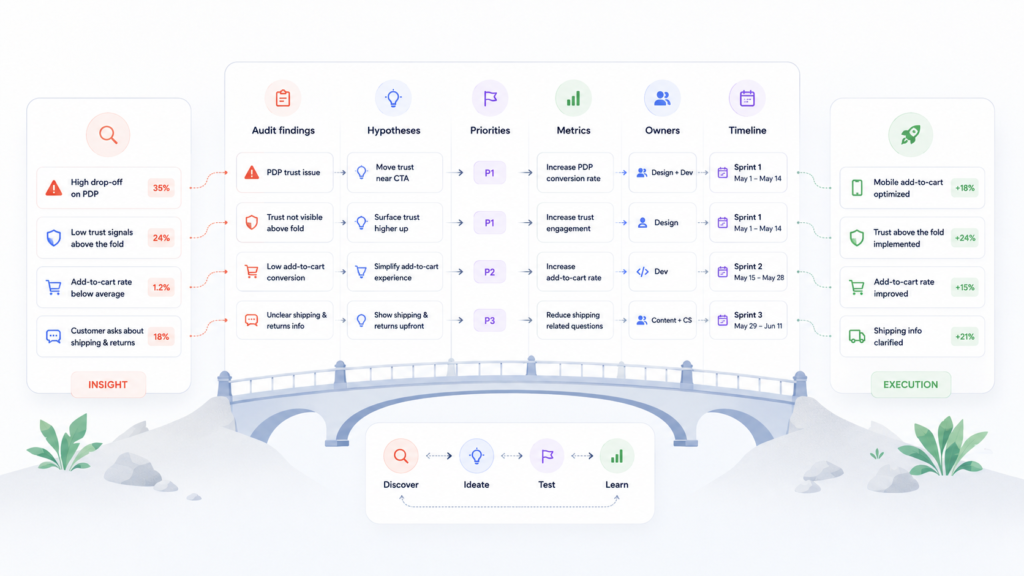
A Shopify CRO testing roadmap is not just a backlog of ideas. It is a prioritized plan for what your team will test, fix, and implement to improve conversion, AOV, and revenue efficiency over time.
A good Shopify CRO roadmap:
- Connects findings (what’s broken or underperforming)
- To hypotheses (what you expect to change and why)
- To priorities (what matters most now)
- To metrics (how you’ll know if it worked)
- To owners and timelines (who will do what, and when).
In other words, it is the bridge between insight and execution.
A strong roadmap answers questions like:
- What should we test first?
- What should we fix immediately without testing?
- What depends on other work to be in place?
- What should we measure for each change?
- What can wait until later sprints?
When you treat your Shopify CRO roadmap as a living system instead of a static list, your team stops reacting randomly and starts improving the store in a deliberate, compounding way.
Why Shopify Teams Need a Roadmap Instead of More Ideas
Most Shopify teams are not short on ideas. They are short on focus.
Common patterns:
- Redesigns happen before the biggest friction points are even proven.
- Teams run low-impact button or headline tests while major PDP or cart issues stay untouched.
- Developers are flooded with “quick wins” that never map back to a clear conversion problem.
- Stakeholders push personal preferences instead of evidence.
A Shopify CRO roadmap solves this by:
- Reducing random experimentation – Ideas are evaluated against impact, confidence, and effort before they get into the roadmap.
- Aligning CRO with business goals – Tests and fixes map to metrics that actually matter: revenue per visitor, AOV, mobile conversion, add-to-cart rate, etc.
- Keeping teams in sync – Design, marketing, and development work from the same prioritized list instead of separate wishlists.
- Preventing redesign-led CRO – You avoid big visual changes driven by opinion instead of data.
If your backlog feels noisy and your progress feels slow, you probably don’t need more test ideas. You need a clear Shopify CRO testing roadmap that tells everyone what to do first and why.
What Should Go Into a Shopify CRO Roadmap?
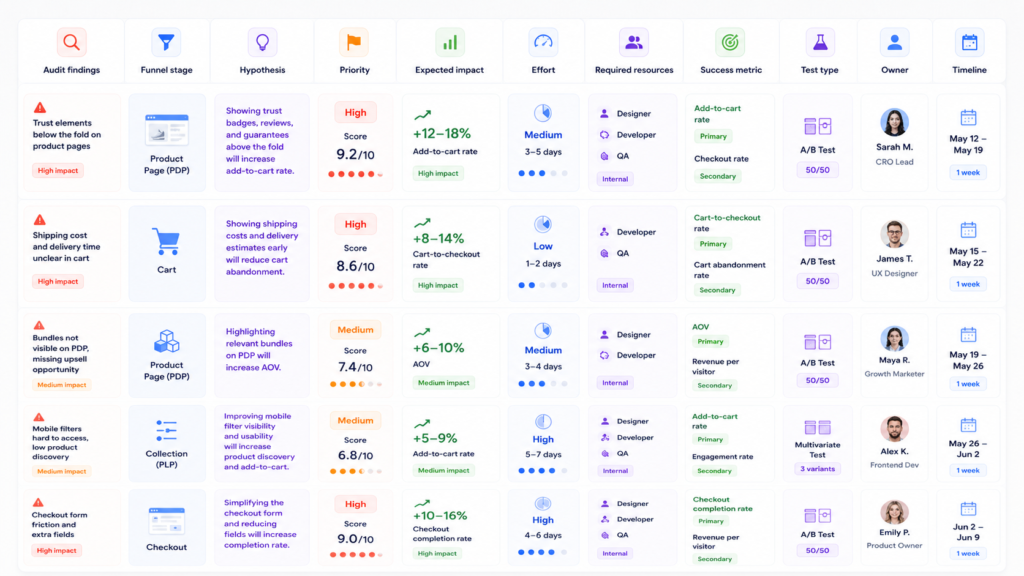
A practical Shopify CRO roadmap is usually structured as a table or board. The exact tool matters less than the fields you include.
Core components:
- Audit findings – What’s broken, unclear, or underperforming now.
- Funnel-stage problems – Where in the journey these issues appear (landing, PDP, cart, checkout, mobile, AOV, etc.).
- Hypotheses – What you expect to happen if you change something.
- Priority level – How important this item is versus everything else.
- Expected impact – Revenue or conversion effect if you’re right.
- Implementation effort – Design, dev, QA, and coordination complexity.
- Required resources – Who needs to be involved.
- Success metrics – The primary metric you will watch.
- Test or implementation type – A/B test, split URL test, UX change, content change, technical fix, etc.
- Owner and timeline – Who is responsible and in which sprint.
When you capture these fields, you move from “we have ideas” to “we have a plan.”
Start with Audit Findings, Not Assumptions
A Shopify CRO roadmap is only as good as the input it is built on. That input should be structured audit findings, not internal opinions. If you haven’t already, start from a proper audit and checklist:
- A full Shopify CRO audit that reviews product pages, navigation, search, collections, cart and checkout, mobile UX, trust signals, and merchandising.
- A structured Shopify CRO audit checklist so you don’t miss obvious UX and messaging gaps.
From that audit work, you should be able to answer:
- Where do users hesitate or drop off?
- Where is the messaging unclear or incomplete?
- Where does the UX make important actions harder than they should be?
- Where are there AOV opportunities (bundles, cross-sells, incentives) that aren’t used well yet?
Roadmap quality depends on input quality. If your findings are vague, your roadmap will be vague too.
Organize audit findings before you write a single hypothesis. Group them by page type, funnel stage, and severity so you can see patterns, not just individual screenshots.
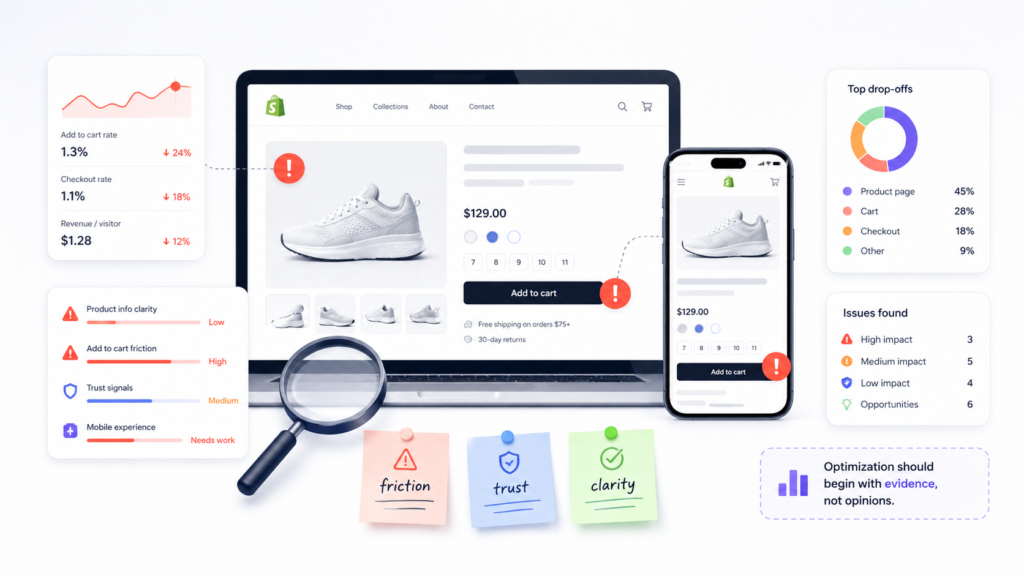
Map Findings to Funnel Stages
Once you have structured findings, map them to the Shopify conversion funnel:
- Traffic and landing pages – Are visitors arriving on relevant pages with clear value propositions?
- Discovery stage – Can they easily find the right categories, filters, and products?
- Product page stage (PDPs) – Do PDPs answer real buying questions, build trust, and make the “add to cart” decision feel safe?
- Add-to-cart stage – Is the path from PDP to cart smooth on desktop and mobile?
- Cart and checkout stage – Is there friction around shipping, taxes, payment options, or form UX?
- Mobile-specific friction – Is the mobile experience noticeably worse than desktop for key flows?
- AOV and merchandising – Are there smart, relevant ways to increase order value without being pushy?
This keeps your team from treating every issue as equal. A minor UX nit on a blog template does not deserve the same attention as a major cart-blocking problem.
If you need a deeper framework for this, pair your roadmap with a dedicated funnel analysis. (See: How to Analyze a Shopify Conversion Funnel).
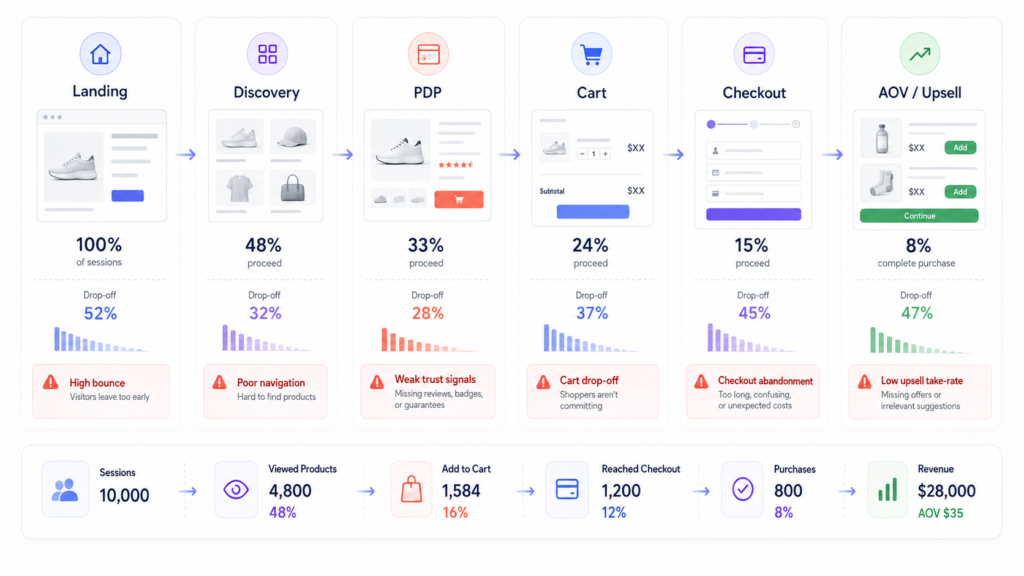
Turn Findings into Clear CRO Hypotheses
Findings alone are not enough. A list of problems is still not a roadmap. Each meaningful issue needs to become a clear CRO hypothesis: If we change X for Y audience on Z page or step, then metric M will improve because reason.
Example:
- Finding: Key trust details (shipping, returns, reviews) are buried low on mobile PDPs.
- Hypothesis: If we move trust and shipping clarity closer to the primary CTA on mobile PDPs, more visitors will feel confident to add to cart, increasing mobile add-to-cart rate.
- Metric: Mobile add-to-cart rate and PDP-to-cart progression.
Another example:
- Finding: Cart page hides shipping costs until late in the flow.
- Hypothesis: If we show estimated shipping earlier in the cart, fewer users will abandon when they see the final price.
- Metric: Cart-to-checkout rate and cart abandonment rate.
This “finding → hypothesis → metric” structure makes your roadmap actionable and measurable. It also forces you to connect UX or content tweaks to real business outcomes, not just aesthetics.
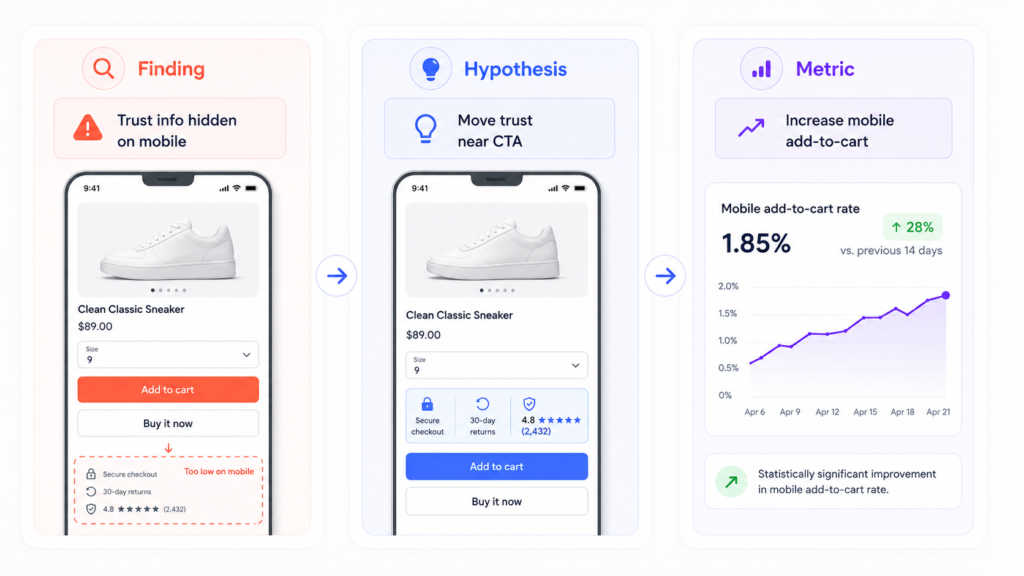
Prioritize by Impact, Confidence, and Effort
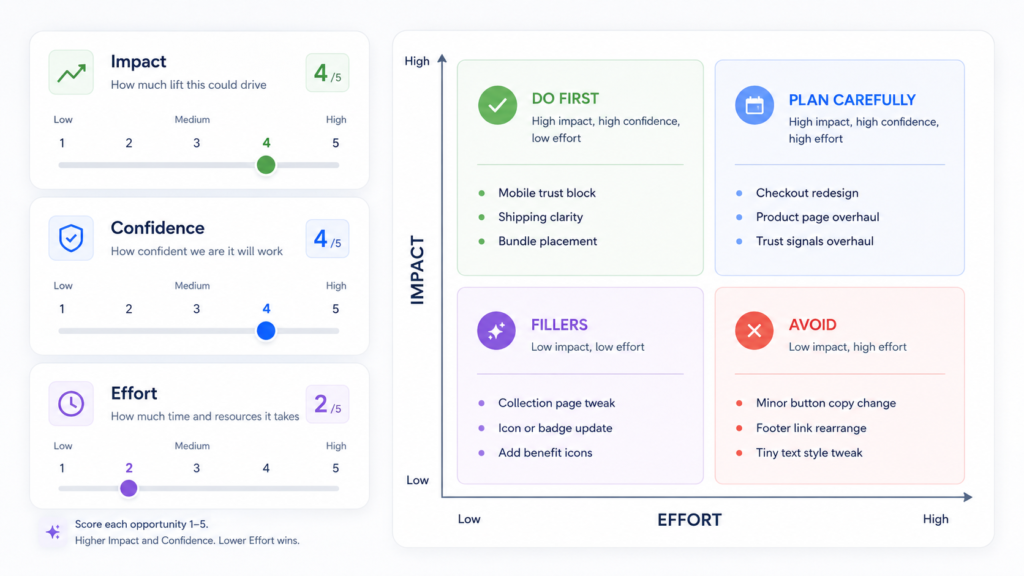
Once you have a set of hypotheses, you need to prioritize Shopify CRO tests.
A simple, effective model uses three dimensions:
- Impact – If this works, how big is the effect on revenue, conversion, or AOV?
- Confidence – How strong is the evidence that this is a problem and that your hypothesis is correct?
- Effort – How much design, development, QA, content, and coordination effort will this change require?
You don’t need a complicated scoring system. Even a basic 1–3 rating for each can work.
In practice, you’ll usually see four buckets:
- High impact / low effort → Do first.
- High impact / high effort → Plan carefully and break into phases.
- Low impact / low effort → Consider as fillers when capacity allows.
- Low impact / high effort → Usually avoid.
For example:
- Moving critical trust elements above the fold on high-traffic PDPs might be high impact / low–medium effort → early in the roadmap.
- Replatforming checkout might be high impact / very high effort → planned as a multi-phase roadmap initiative, not a “test of the week.”
- Changing button microcopy on a rarely visited page is often low impact / low effort → only worth doing if it’s almost free.
The goal is not to chase perfection. The goal is to ensure your first tests and fixes hit meaningful friction points, not cosmetic details.
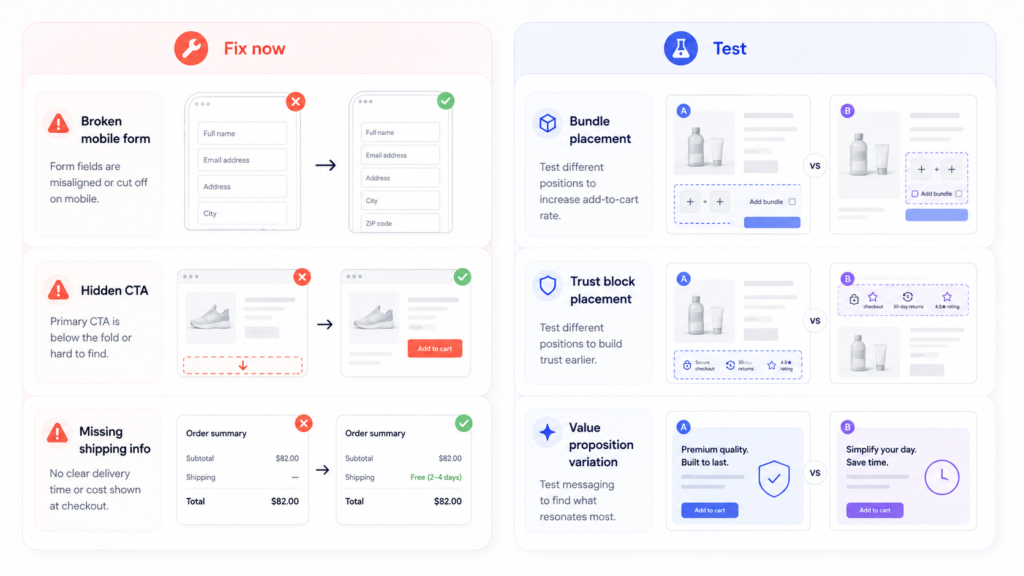
Separate Immediate Fixes from True Tests
Not every CRO opportunity needs an A/B test. Some issues are so obviously broken that your roadmap should treat them as fixes, not experiments.
Examples of “fix now” items:
- Broken or misleading error messages
- Forms that fail or behave inconsistently on mobile
- PDPs with missing basic information (sizes, materials, shipping, returns)
- Checkout fields that are unnecessary and create friction
- Visual bugs that hide CTAs or make text unreadable
Use tests when there are multiple reasonable options or when trade-offs are unclear. For example:
- Which of two value propositions resonates more with first-time visitors?
- Which type of bundle presentation increases AOV without hurting conversion?
- Which layout best supports comparison across similar products?
A healthy Shopify testing roadmap clearly separates:
- Fix now – Obvious UX or messaging problems.
- Test next – Hypotheses where experimentation will guide the better option.
- Monitor later – Ideas worth keeping on the radar but not yet priority.
This protects your team from wasting experimentation capacity on changes that you should simply make.
Organize the Roadmap by Store Area
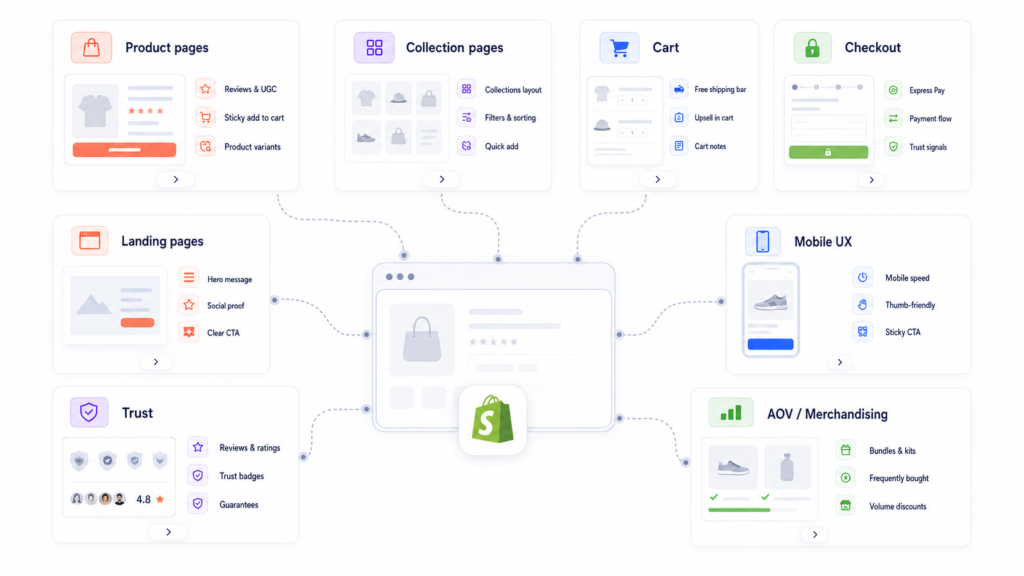
To make execution manageable, structure your Shopify CRO roadmap by store area as well as by priority.
Common groupings:
- Product pages (PDPs) – Messaging, imagery, trust blocks, sizing, shipping, reviews, and CTAs. (Deeper reference: Shopify Product Page Optimization Guide – example).
- Collection pages – Filters, sorting, merchandising, badges, and product-card information.
- Cart and checkout – Shipping clarity, price transparency, payment options, form UX, and reassurance. (See: Shopify Cart and Checkout Optimization Guide).
- Mobile UX – Navigation, tap targets, scroll depth, sticky CTAs, and page speed. (See: Mobile UX Fixes That Improve Shopify Conversion Rate).
- Trust and reassurance – Social proof, guarantees, policies, and risk reducers.
- AOV and merchandising – Bundles, upsells, cross-sells, incentives, and pricing structures. (See: How to Increase Average Order Value on Shopify and Upsells and Bundles for Shopify Stores: What Actually Works).
- Landing pages / campaigns – Campaign-specific LPs for paid traffic or email promotions.
This structure makes it easier to plan sprints around specific areas (e.g., “product page sprint” or “cart and checkout sprint”) while still respecting overall priorities.
Define Metrics Before You Start Testing
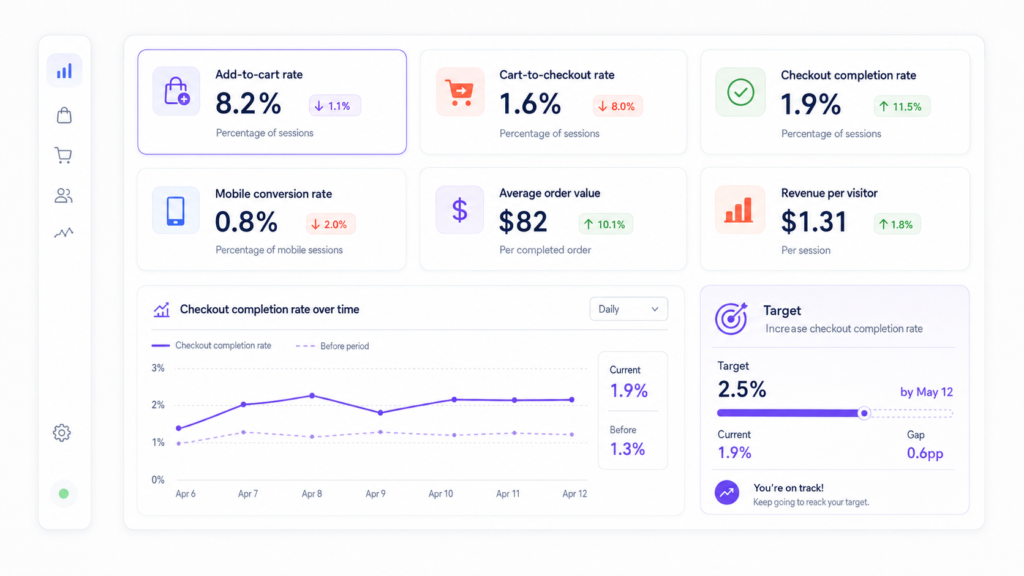
A roadmap without clear metrics is just a to-do list. Before you execute any roadmap item, define what success looks like and make sure your tracking is reliable. Typical Shopify testing and optimization metrics:
- Add-to-cart rate
- Product-page progression (PDP → cart)
- Cart-to-checkout rate
- Checkout completion rate
- Mobile conversion rate
- Average order value (AOV)
- Revenue per visitor (RPV)
Every roadmap item should be tied to one primary success metric and, where relevant, a guardrail metric (e.g., maintain AOV while increasing conversion). If your analytics setup is weak, prioritize fixing that early in the roadmap. A dedicated analytics review or audit often unlocks better testing quality. (Future companion content: What to Review in a Shopify Analytics Audit, plus your Shopify App Integration capabilities.) Do not start testing until you trust the numbers your decisions depend on.
Build Around Resource Reality, Not Ideal Scenarios
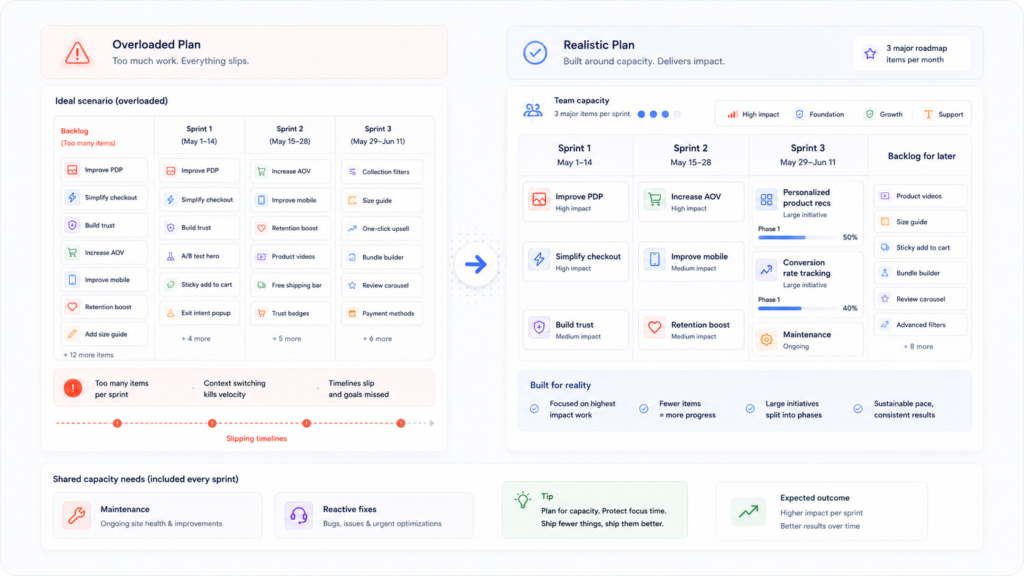
A beautiful roadmap that your team cannot execute is just another form of busywork. Your Shopify CRO roadmap should reflect real design and development capacity, not wishful thinking. Practical guidelines:
- Be honest about how many experiments or UX changes your team can ship per month.
- Treat large, high-impact projects (e.g., a major cart redesign) as multi-phase roadmap items.
- Sequence big initiatives so they don’t collide with peak sales periods or other heavy projects.
- Reserve bandwidth for maintenance and reactive fixes.
A realistic roadmap almost always outperforms an ambitious one that constantly slips.
It’s better to commit to three high-quality roadmap items per month and deliver them consistently than to plan for ten and finish two.
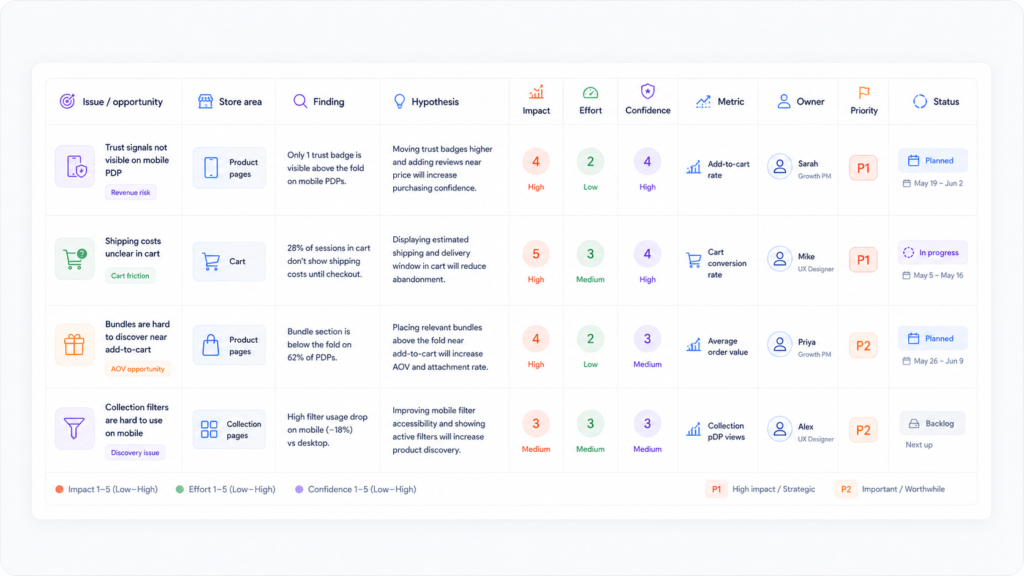
Example Structure of a Shopify CRO Roadmap
In practice, your roadmap might live in a spreadsheet, project tool, or custom dashboard. A simple but effective structure could include columns like:
- Issue / opportunity
- Store area
- Finding
- Hypothesis
- Impact
- Effort
- Confidence
- Metric
- Owner
- Priority
- Status
Here is a simplified example:
| Issue / opportunity | Store area | Finding | Hypothesis | Impact | Effort | Confidence | Metric | Priority | Status |
| PDP trust visibility on mobile | PDPs | Reviews & shipping buried below the fold on mobile | Moving trust and shipping details above the fold will increase mobile add-to-cart rate | High | Medium | High | Mobile add-to-cart, PDP→cart | P1 | Planned |
| Cart shipping clarity | Cart | Shipping costs only visible late in checkout | Showing estimated shipping earlier will reduce cart abandonment | High | Low | Medium | Cart-to-checkout, abandonment | P1 | Backlog |
| Bundle placement near add-to-cart | PDPs | Bundles shown far down the page | Moving bundles closer to the main CTA will increase AOV without hurting conversion | Medium | Medium | Medium | AOV, PDP→cart | P2 | Backlog |
| Collection-page filter usability | Collections | Filters hard to find and confusing on mobile | Clear, sticky filters will help users find products faster and increase product-page views per session | Medium | Medium | Medium | Product-page views/session | P2 | Backlog |
Your actual roadmap will be longer, but this structure keeps every line item tied to a clear finding, hypothesis, and metric.
Common Shopify CRO Roadmap Mistakes
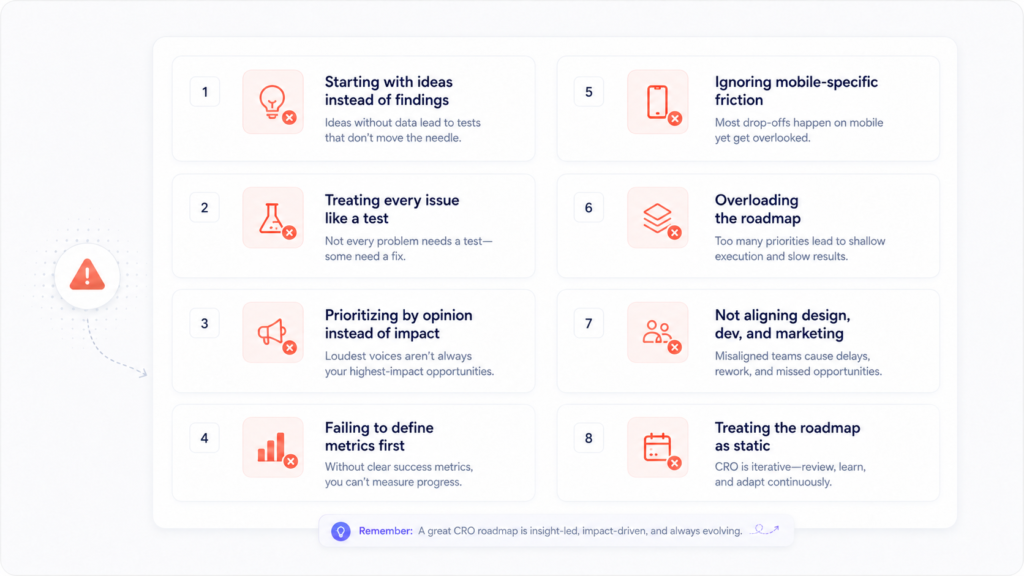
When teams start working with roadmaps, a few patterns often get in the way:
- Starting with ideas instead of findings – Brainstorms come before audits, so tests are built on assumptions.
- Treating every issue like a test – Obvious usability problems get pushed into A/B tools instead of being fixed.
- Prioritizing by opinion instead of impact – Loudest stakeholder wins instead of strongest evidence.
- Failing to define metrics first – Teams run experiments, then struggle to say whether they worked.
- Ignoring mobile-specific friction – Desktop flows receive all the attention while mobile conversion quietly drags.
- Overloading the roadmap – Hundreds of items get logged, but very few ever move to “done.”
- Not aligning design, dev, and marketing – Each team has its own separate list and priorities.
- Treating the roadmap as static – The plan never adjusts based on new findings, seasonality, or capacity changes.
Your Shopify CRO testing roadmap should feel like a working system, not a document you update once a quarter.
A Simple Shopify CRO Roadmap Checklist
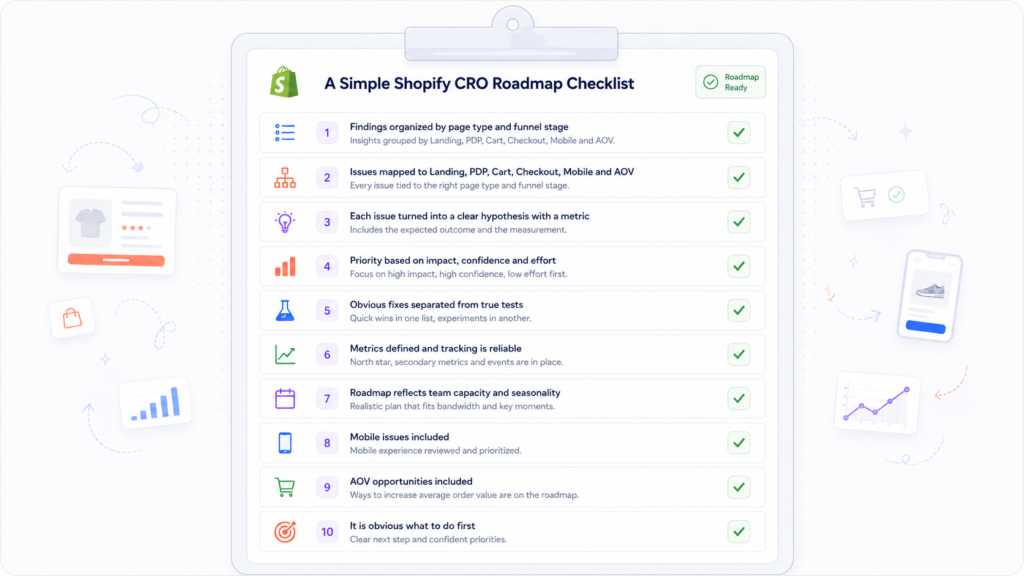
Use this checklist to pressure-test your roadmap before you commit to the next quarter of work:
- Have audit findings been organized clearly by page type and funnel stage?
- Are issues mapped to where they affect the journey (landing, PDP, cart, checkout, mobile, AOV)?
- Has each important issue been turned into a clear hypothesis with a defined metric?
- Is priority based on impact, confidence, and effort, not just opinions?
- Have obvious UX and clarity problems been separated from true tests?
- Are success metrics defined and is tracking reliable before implementation?
- Does the roadmap reflect actual team capacity and seasonal constraints?
- Are mobile-specific issues included, not just desktop flows?
- Are AOV and merchandising opportunities part of the plan where relevant?
- Does the roadmap make it obvious what to do first?
If you can’t answer “yes” to most of these questions, refine the roadmap before you ask your team to execute it.
Final Thoughts – A Roadmap Should Reduce Guesswork
A strong Shopify CRO testing roadmap is what turns scattered ideas into coordinated progress.
When audit findings, funnel insights, hypotheses, priorities, and metrics are clearly connected, your team:
- Stops reacting to random requests
- Focuses on the highest-impact problems first
- Uses experiments where they add real value
- Treats CRO as an ongoing system instead of a one-off project
Ultimately, a good Shopify CRO roadmap should make your work less chaotic and more predictable. You know what you’re doing this month, why it matters, and how you’ll measure success.
If you want a roadmap that connects your store’s audit findings to a realistic, prioritized testing plan – and a team that can help with strategy, design, and implementation – your Shopify CRO agency page is the natural next step.
Need help building a CRO roadmap for your Shopify store?
We help Shopify brands turn audit findings and funnel issues into a prioritized optimization plan with strategy, design, and implementation support.