How to Analyze a Shopify Conversion Funnel
Many Shopify brands talk about “conversion rate” as if it’s a single, simple number.
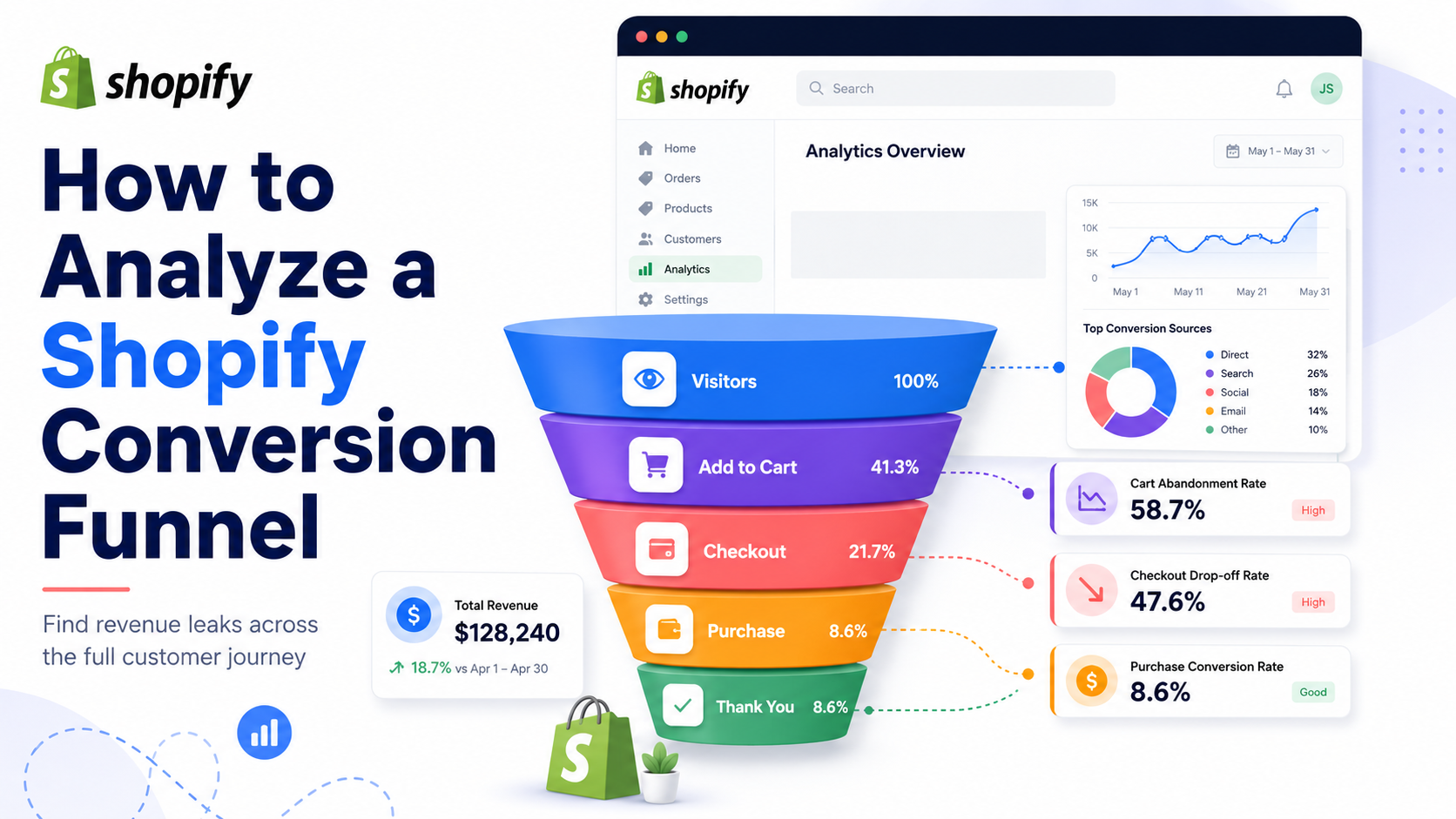
In reality, that number hides where the real problems live.
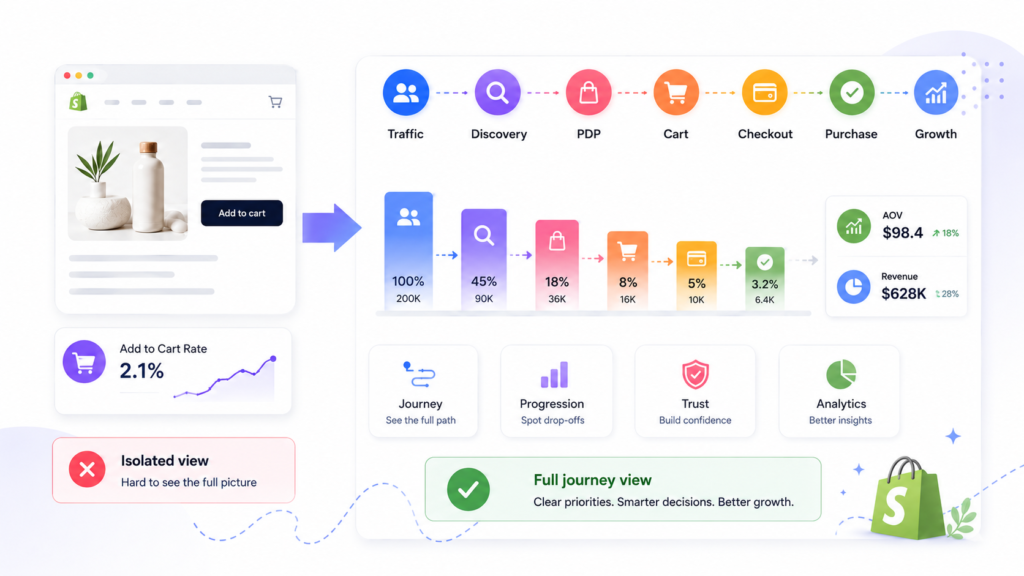
A Shopify conversion funnel is the full journey from the moment a visitor lands on your store to the moment they complete a purchase (and ideally, return again). If you only look at overall conversion rate or checkout drop-off, you’ll miss where momentum is actually breaking.
A focused Shopify funnel analysis breaks the journey into clear stages so you can see:
- Where users hesitate or drop off.
- Which pages or interactions quietly leak revenue.
- Which fixes will have the biggest impact on revenue efficiency.
In this guide, we’ll walk through how to analyze a Shopify conversion funnel step by step – from traffic quality and landing pages to product discovery, product pages, cart, checkout, mobile UX, trust, and AOV. The goal is to help you make better CRO decisions, not just run more tests.
Along the way, we’ll show you how funnel analysis connects naturally to broader CRO work. If you want a partner to turn these insights into a roadmap, explore working with a specialized Shopify CRO agency.
What Is a Shopify Conversion Funnel?
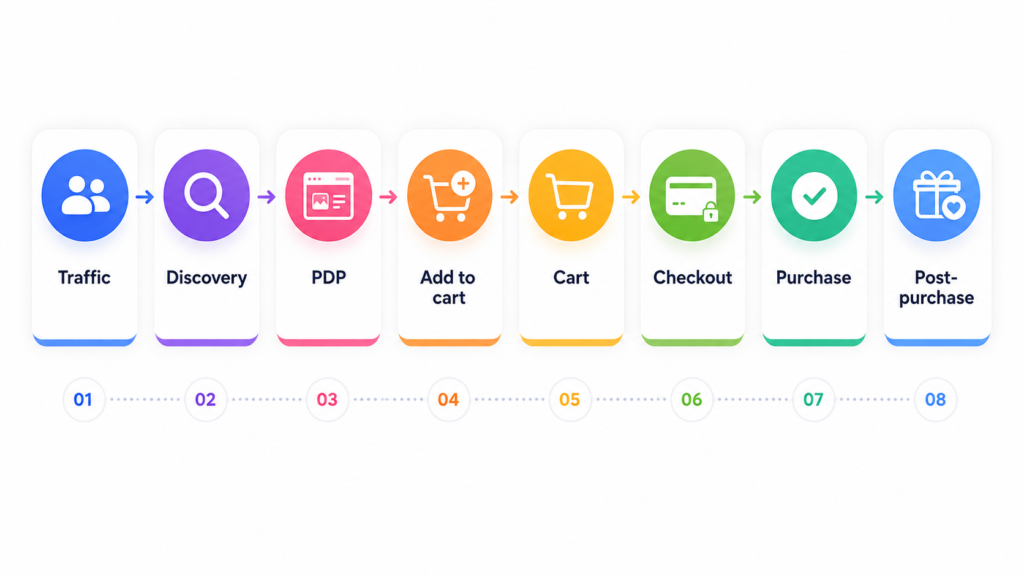
A Shopify conversion funnel is the sequence of stages a user goes through from first arrival on your store to completing a purchase.
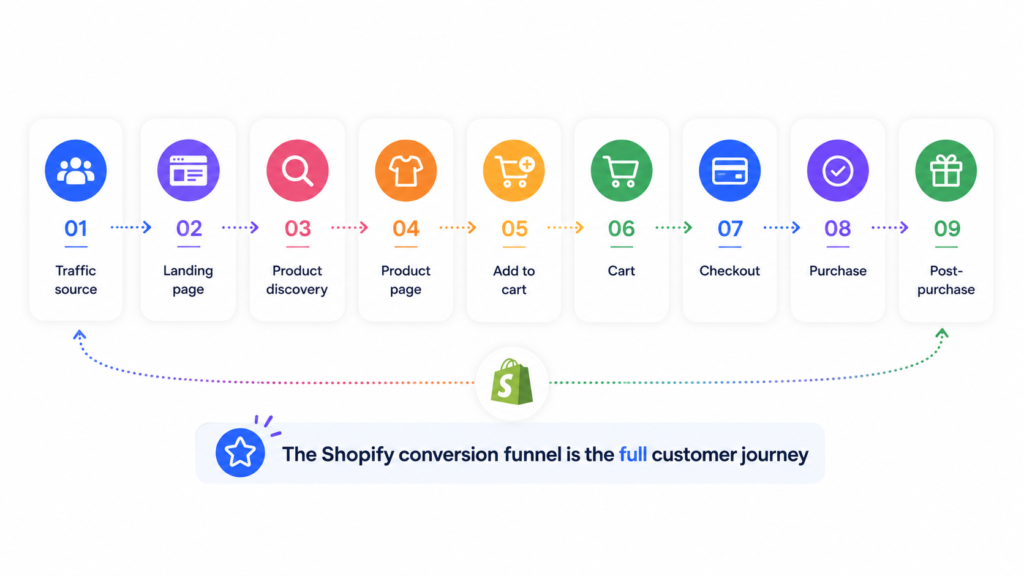
It is not just “cart → checkout → purchase”. A realistic funnel includes:
- Traffic source and landing page – where visitors come from and what they see first.
- Product discovery – how they find relevant products.
- Product page evaluation – how they understand the offer and build confidence.
- Add-to-cart decision – the moment curiosity turns into buying intent.
- Cart review – where total cost, shipping, and final decisions happen.
- Checkout progression – form completion, payment, and final friction.
- Purchase completion – successful order.
- Post‑purchase value opportunities – upsells, reorders, referrals, and email.
A strong conversion funnel for Shopify moves users through these stages with as little confusion and hesitation as possible. Every interaction either builds momentum or leaks it.
The key mindset shift:
A conversion funnel is not only about the final transaction. It’s about how effectively your store moves users from first interest to confident purchase.
When you analyze your Shopify customer journey this way, you stop blaming a single page and start seeing how each stage feeds the next.
Why Funnel Analysis Matters for Shopify CRO
If you’re doing Shopify conversion rate optimization and only looking at one or two templates (usually the product page or checkout), you’re working with a narrow view.
Conversion problems are rarely isolated. Some common patterns:
- Good PDPs, weak collection pages – Users never find the right products, so even strong product pages don’t get enough qualified traffic.
- Strong traffic volume, poor landing-page match – Ads or SEO bring in the wrong intent, or they dump users on generic pages instead of relevant collections.
- Healthy add-to-cart, weak cart-to-checkout progression – Product pages do their job, but cart clarity, pricing transparency, or shipping information creates last-minute doubt.
- Good desktop funnel, poor mobile flow – The “real” funnel performance is distorted because most users are on mobile where UX is much weaker.
A structured Shopify funnel analysis helps you:
- Pinpoint where the biggest revenue leaks happen.
- Prioritize changes based on stage-by-stage friction, not guesses.
- Avoid wasting time on page-level tweaks that don’t address the real bottleneck.
This is also where funnel analysis supports your broader conversion optimization services. Instead of reacting to a single metric, you’re improving the whole journey in a logical order.
The Main Stages of a Shopify Conversion Funnel
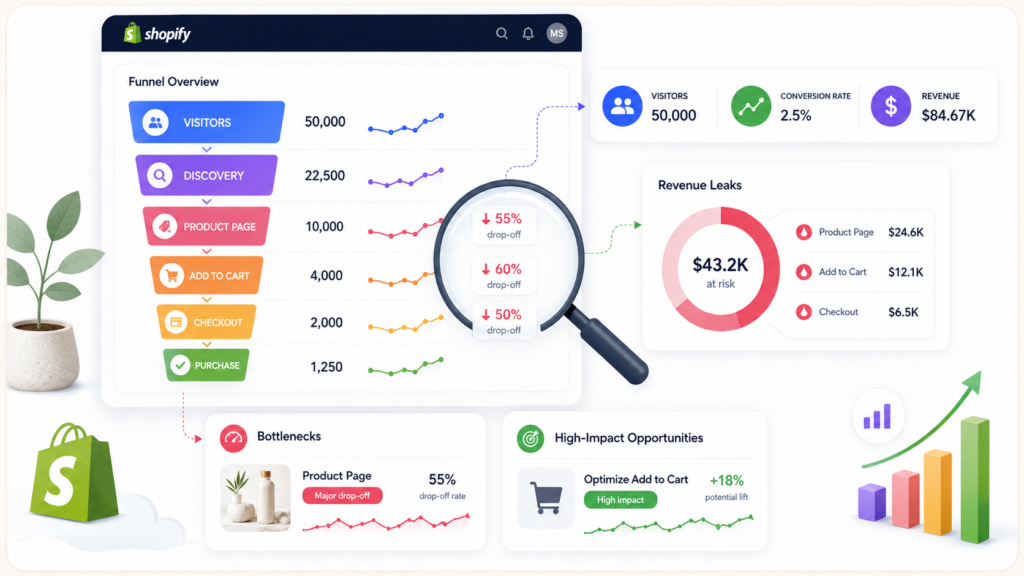
Before you analyze data, you need a clear map of the journey. For most Shopify stores, a practical funnel looks like this:
- Traffic source and landing page. How visitors arrive and which page they see first?
- Product discovery. How they browse collections, filter, search, and narrow down options?
- Product page evaluation. How they understand the offer, benefits, and risks?
- Add to cart decision. The moment a user commits to moving an item into the cart?
- Cart review. Where total cost, shipping, and final decisions crystallize?
- Checkout progression. How easily users can complete forms, choose shipping and payment, and place the order?
- Purchase completion. The successful transaction event?
- Post‑purchase value opportunities. Upsells, cross‑sells, subscriptions, and retention flows?
You can visualize this as a vertical funnel or horizontal journey. The exact diagram doesn’t matter as long as:
- Each stage is clearly defined.
- You know what success looks like at that stage.
- You can measure how many users progress from one step to the next.
With this structure in place, you can start analyzing where leaks appear and which improvements will move the needle most.
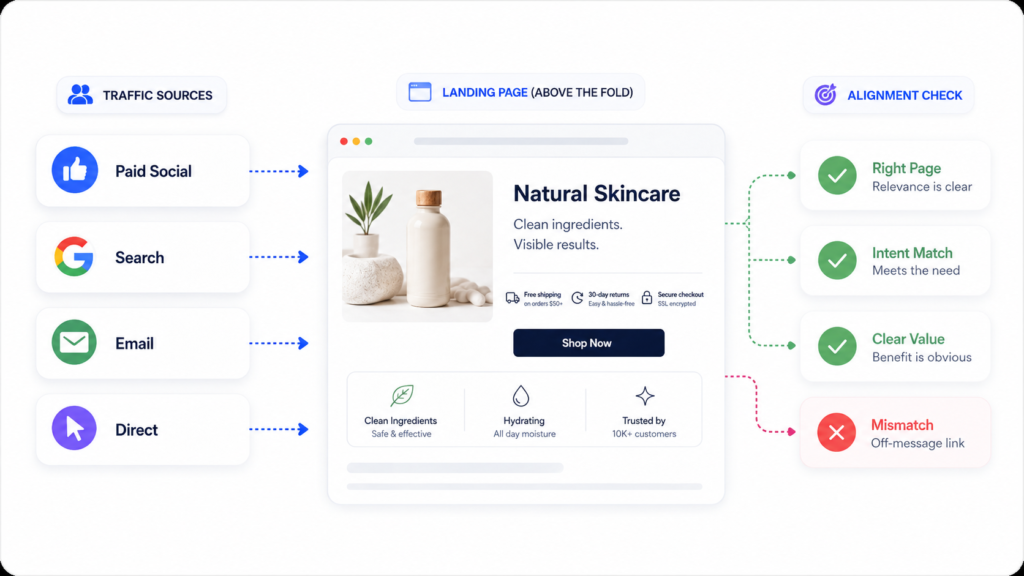
Step 1 – Review Traffic Quality and Landing Page Alignment
Most Shopify funnels start leaking before the product page.
If the wrong people land on the wrong page with the wrong expectations, no amount of PDP polishing will fix conversion.
Why traffic quality matters
Not all traffic converts equally. Consider these differences:
- Paid vs organic vs email – Users from a warm email list behave very differently from cold paid social traffic.
- Branded vs non‑branded search – People searching for your brand already trust you; category keywords bring in colder visitors.
- Awareness vs intent campaigns – Top‑of‑funnel campaigns naturally convert worse than bottom‑of‑funnel campaigns.
Landing page alignment
For each major traffic source or campaign, ask:
- Are users landing on the right page? (e.g., targeted collection vs generic home page)
- Does the landing page match the promise of the ad or keyword?
- Is the value proposition obvious quickly above the fold?
- Is there a clear next step (browse products, pick a collection, start a quiz, etc.)?
When there’s a mismatch between user intent and the first screen, you’ll see:
- High bounce rates.
- Low engagement depth.
- Very few users progressing to product discovery.
As part of a broader Shopify funnel audit, start by aligning traffic sources and landing pages before jumping into template tweaks. This alone can unlock meaningful conversion gains.
Step 2 – Analyze Product Discovery and Navigation
Before a user can buy, they have to find the right product.
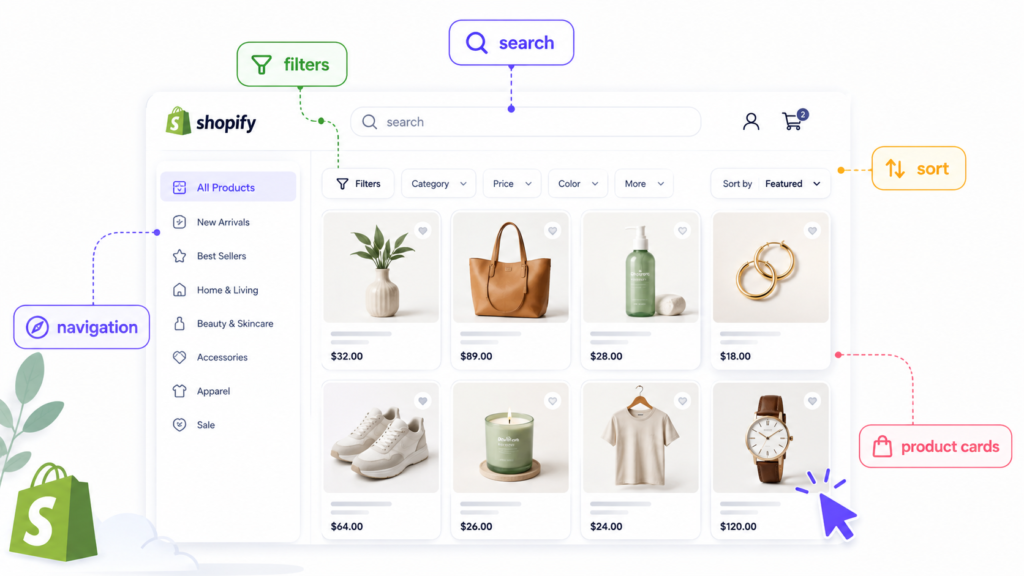
This is where many Shopify funnels quietly leak revenue: collections, filters, search, and navigation receive less attention than PDPs or checkout, even though they control whether users ever see relevant offers.
Collections and category logic
Ask:
- Do your collections reflect how customers naturally think about your products (use cases, problems, styles), or only your internal catalog structure?
- Are there obvious “bridge” collections that help users go from broad to narrow (e.g., “New in”, “Best‑sellers”, “Gifts under $50”)?
- Do key collections have clear, benefit‑driven copy that sets expectations?
If users land on a collection page with too many options and too little guidance, many will leave before ever viewing a PDP.
Filters and sorting usability
Review your filters and sorting on desktop and mobile:
- Are filters easy to access and understand (e.g., size, color, material, price, fit)?
- Do they reflect how your ideal buyers actually narrow choices?
- Is sorting helpful (e.g., “Best‑selling”, “Price – low to high”, “New arrivals”)?
- Does applying filters feel fast and responsive, or slow and frustrating?
Weak filtering turns product discovery into a chore, which kills funnel momentum early.
Navigation clarity
Check your main navigation and menus:
- Are key categories obvious from the top menu?
- Are there too many items, making decisions harder?
- Is there a clear path for new users who don’t yet know what they want?
A good navigation structure reduces cognitive load and guides users smoothly into relevant collections.
Product card quality
On collection and search results pages, product cards do a lot of heavy lifting. Evaluate:
- Image quality and consistency.
- Clarity of product names.
- Price visibility (including discounts if relevant).
- Key trust signals (e.g., ratings, badges) where appropriate.
Strong product cards increase click‑through to PDPs and support healthier funnel progression.
Step 3 – Review Product Page Performance as a Funnel Stage
Product pages are where curiosity should turn into serious buying intent.
When analyzing Shopify product page optimization, treat PDPs as one stage in the journey – not the only place conversion happens.
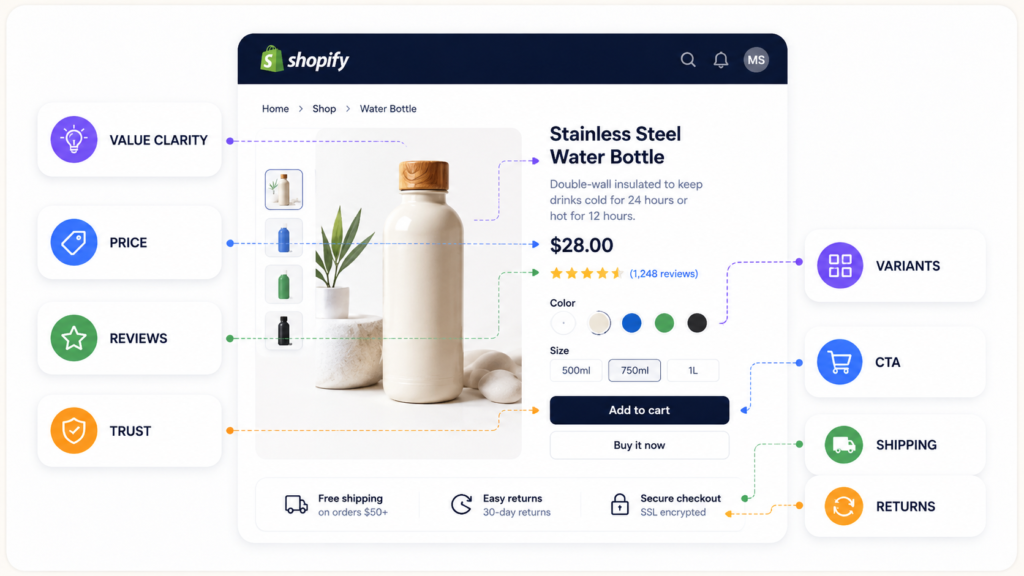
Message clarity
- Is it immediately clear what the product is and who it’s for?
- Does the hero area communicate the main benefit or transformation?
- Is the copy specific enough to answer “Why this product over alternatives?”
Offer and pricing clarity
- Are price, discounts, and any subscription options clearly explained?
- Are shipping, taxes, or additional fees communicated early enough?
- Is there a clear sense of value relative to price?
Trust and reassurance
- Are reviews, ratings, and social proof visible and believable?
- Do you explain returns, guarantees, and support clearly?
- Are there certifications, materials, or sourcing details that matter to your audience?
CTA visibility and hierarchy
- Is the main call to action (“Add to cart”, “Buy now”) clearly visible on desktop and mobile?
- Is there unnecessary clutter around the CTA that competes for attention?
- Are secondary actions (e.g., “Add to wishlist”) visually subordinate?
Variant and selection usability
- Is choosing size, color, or configuration simple and error‑proof?
- Do users get clear feedback when an option is out of stock?
If PDPs are weak on clarity, trust, or usability, you’ll see a low add‑to‑cart rate even with solid traffic and discovery.
Over time, you can support PDP work with deeper resources (for example, a dedicated Shopify Product Page Optimization guide or vertical‑specific content like CRO for clothing brands and Shopify CRO for cosmetic brands).
Step 4 – Measure Add-to-Cart Progression Correctly
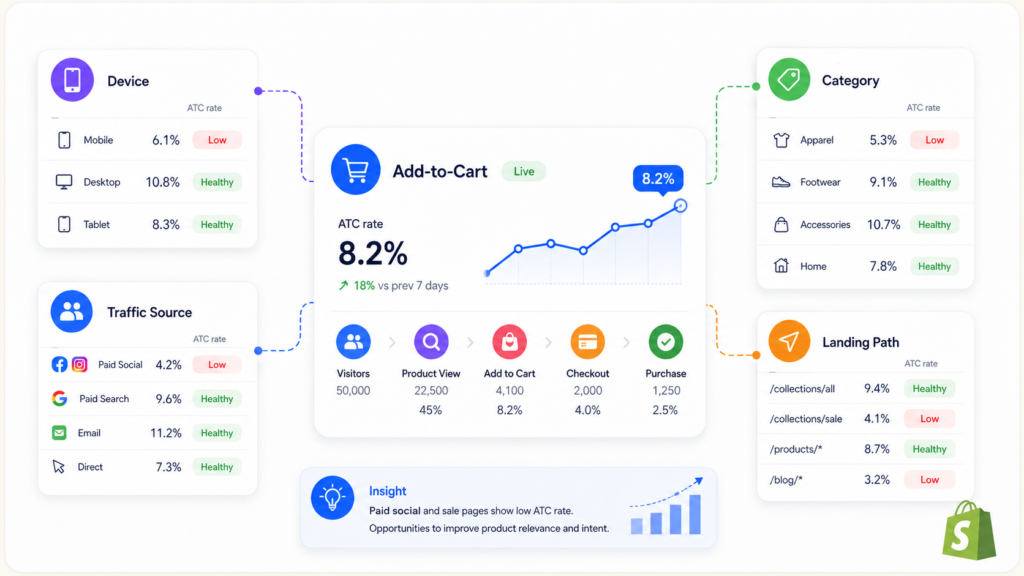
Add to cart is a key funnel signal. It tells you whether your store is converting attention into buying intent.
However, a “low” or “high” add‑to‑cart rate means nothing without context.
Segment your ATC data
Compare add‑to‑cart performance by:
- Product type or category – Some categories convert inherently better than others.
- Device – Desktop PDPs may perform differently from mobile.
- Traffic source and campaign – Cold paid social vs warm search vs email.
- Landing page path – Home → collection → PDP vs ad → PDP directly.
Interpreting low ATC
A low ATC rate can mean different problems:
- Traffic is poorly qualified (wrong intent).
- Offer or pricing isn’t compelling.
- PDP messaging doesn’t answer key questions.
- Mobile layout hides crucial information or the CTA.
- Trust signals are weak or invisible.
Treat add‑to‑cart as one stage in the Shopify funnel progression, and use it to decide where to investigate next – not as a standalone verdict on your store.
Step 5 – Analyze Cart Friction and Checkout Readiness
When users add items to the cart but abandon before checkout, it’s a strong signal that something in this stage is creating doubt or friction.
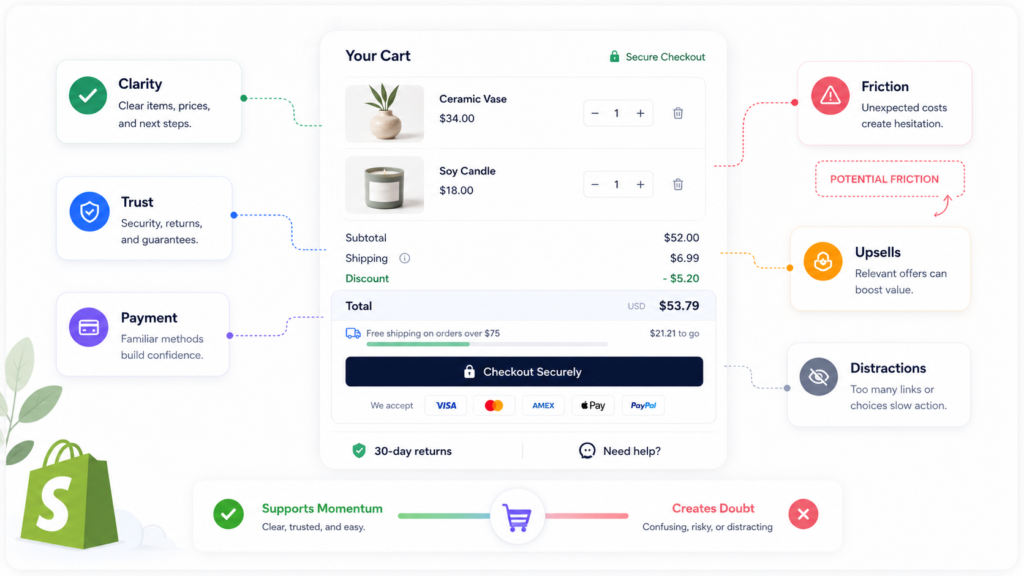
Cart clarity
- Are product details (name, variant, quantity, price) clear at a glance?
- Can users easily update quantities or remove items?
- Is the cart layout clean, or overloaded with distractions?
Pricing transparency
- Are subtotal, discounts, and estimated shipping/taxes visible early?
- Does the cart suddenly reveal unexpected costs that feel like a “gotcha”?
Shipping and delivery expectations
- Do you communicate shipping options, delivery timeframes, and costs clearly?
- Are there clear messages about international shipping, customs, or limitations?
Upsells and bundle relevance
- Are upsells and cross‑sells relevant to the items in the cart?
- Do they enhance the order, or distract from completing the purchase?
Reassurance before checkout
- Is there visible reassurance about secure payment, returns, and support?
- Do badges and trust marks feel genuine rather than noisy?
Poor cart structure can weaken funnel progression even if your PDPs perform well. As you work toward a broader Shopify cart and checkout optimization strategy, make sure this stage supports momentum instead of interrupting it.
Step 6 – Review the Funnel Separately on Mobile
For many Shopify brands, mobile accounts for the majority of traffic – and the majority of funnel risk.
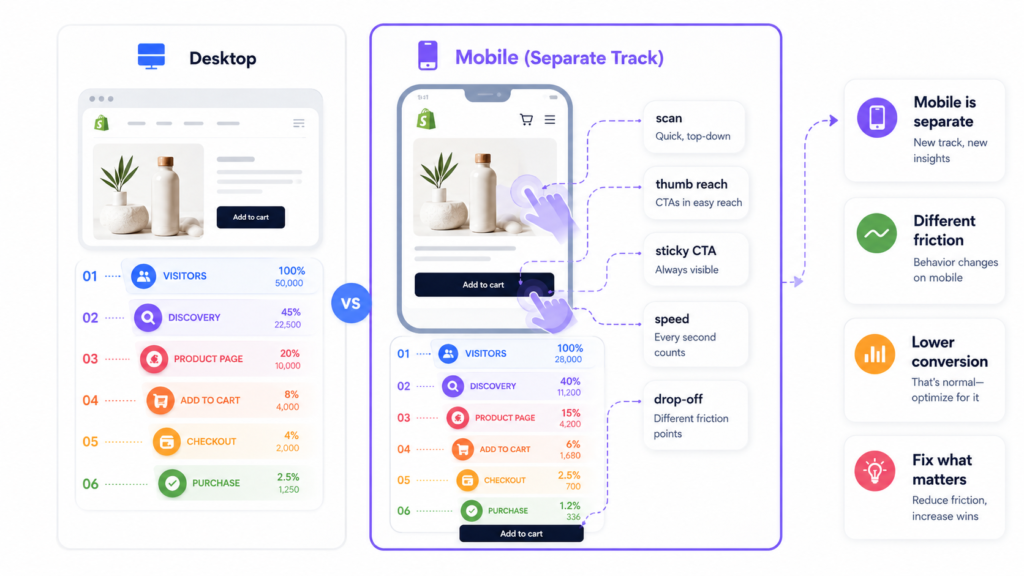
Treat mobile funnel analysis as a separate track, not just a responsive version of desktop.
Mobile-specific behavior
On mobile, users:
- Skim more and read less.
- Rely heavily on images, icons, and headings.
- Are more sensitive to slow load times and layout shifts.
This means product discovery, reading, selection, and cart review are more fragile on mobile.
Key questions for mobile funnel analysis
- Is important information easy to scan without excessive scrolling?
- Are key actions (filter, sort, add to cart, checkout) always visible or quickly reachable with the thumb?
- Are you overusing accordions or hiding critical information behind taps?
- Does the cart and checkout experience feel simple and focused on a small screen?
Small UX issues on mobile often have outsized impact on drop‑off.
Mobile‑first improvements can be supported later with dedicated content around Shopify design, such as Shopify Design Services or a guide to mobile UX fixes that improve conversion rate.
Step 7 – Evaluate Trust and Objection Handling Across the Funnel
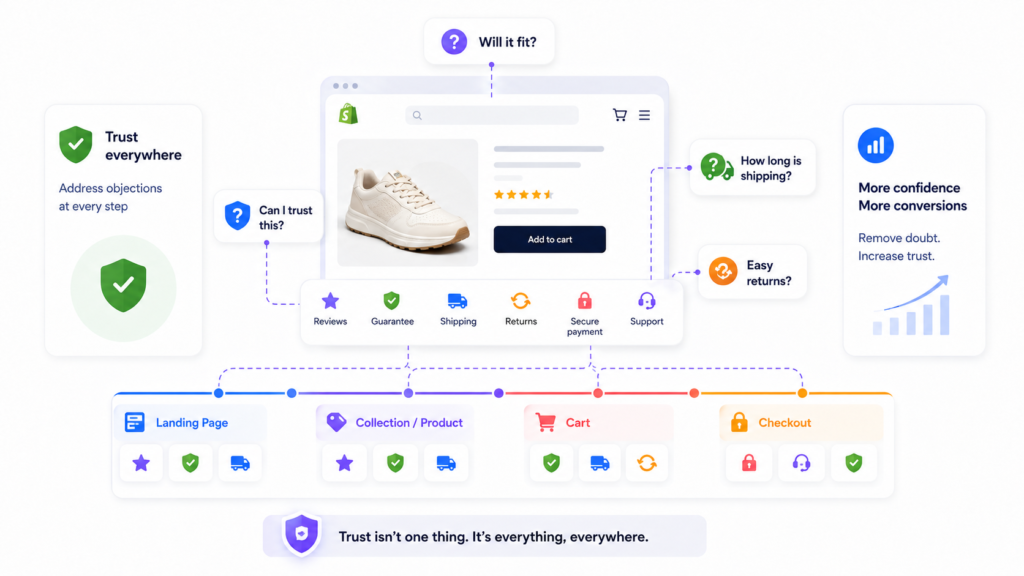
Trust is not a single checklist item on the PDP. It is a funnel‑wide factor.
If users don’t feel confident in your brand, your offer, or your logistics, they’ll drop off – even when the design is clean and the copy is readable.
Where trust appears in the funnel
- Landing pages – Are you clear about who you are and what you stand for?
- Collections and PDPs – Do reviews, UGC, and detailed information feel authentic?
- Cart and checkout – Are policies, guarantees, and support easy to find?
Objection handling
Identify the main questions and worries your ideal customers have:
- Will this product work for me?
- Is the quality worth the price?
- What if it doesn’t fit / I don’t like it?
- How long will shipping take and what will it cost?
- Is this brand trustworthy with my payment details?
Then check where in the funnel you address each objection. Some issues are better handled early (e.g., value proposition), others near the end (e.g., returns, guarantees).
A lot of conversion drop‑off happens because users are unconvinced, not because they are confused. Funnel analysis should surface these reassurance gaps clearly.
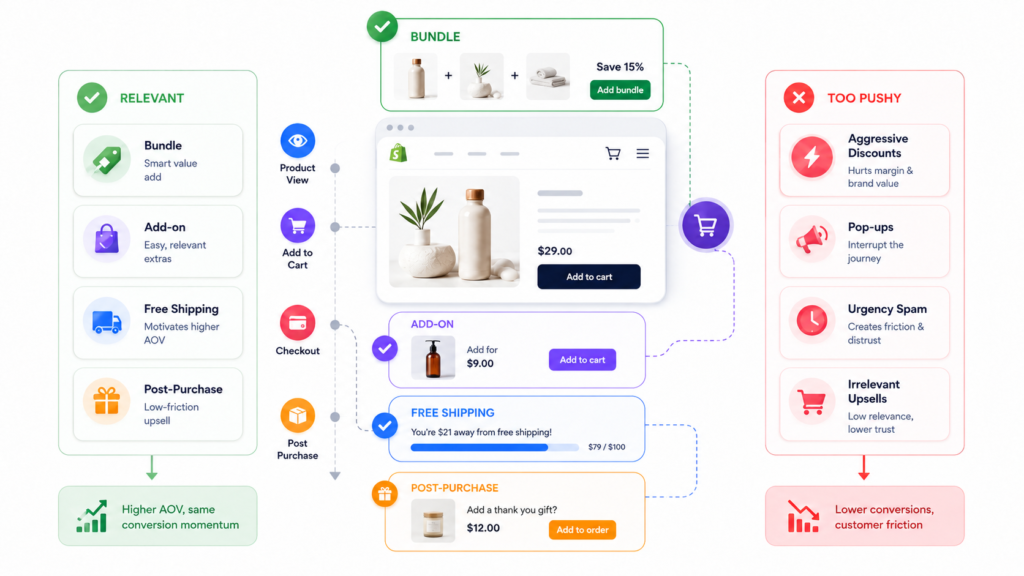
Step 8 – Review AOV Drivers Without Disrupting the Funnel
A healthy funnel doesn’t just convert more visitors – it also improves average order value (AOV) intelligently.
However, many AOV tactics backfire when they interrupt momentum.
Smart AOV drivers
Consider:
- Relevant bundles and kits.
- Complementary add‑ons.
- Threshold‑based incentives (“Free shipping over $X”).
- Post‑purchase upsells via email or order confirmation.
Placement and timing
Ask of each AOV tactic:
- Does this support the user’s existing intent, or collide with it?
- Is the offer clearly relevant based on what’s in the cart?
- Does the timing feel natural (e.g., after adding to cart vs mid‑checkout)?
Your funnel should maximize both conversion rate and order value without making it harder to buy.
Later, you can deepen this work with focused content on topics like increasing AOV on Shopify or practical upsell/bundle strategies.
Step 9 – Segment Funnel Performance Before Making Decisions
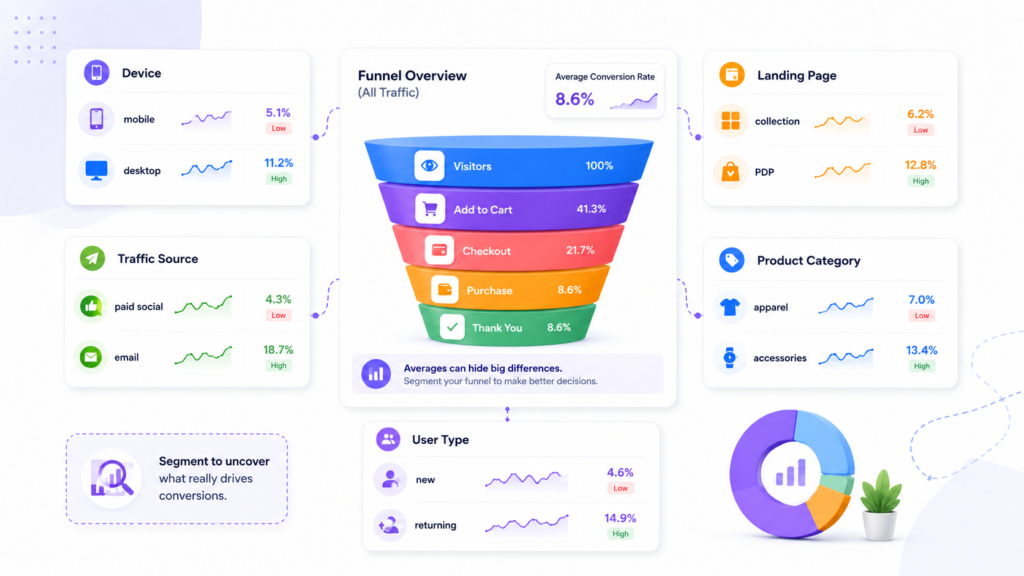
Averages hide problems.
Before you decide “our funnel is broken at X stage”, segment your data.
Useful funnel segments
- Device – desktop vs mobile vs tablet.
- Traffic source – paid search, paid social, organic search, direct, email, referrals.
- Landing page type – home, collection, PDP, campaign landing page, content.
- Product category – core vs long‑tail, high vs low price.
- User type – new vs returning where relevant.
For example:
- Overall conversion might look fine, but mobile is underperforming.
- Branded search might convert well while paid social leaks at the top of the funnel.
- One high‑volume category may be dragging down results for the whole store.
Use segmentation to decide where to investigate first and which hypotheses are worth testing.
Analytics‑focused content, like a dedicated Shopify analytics audit guide or Shopify App Integration, can support deeper dives later – but start with the basics: device, source, landing page, and category.
Metrics to Watch in a Shopify Funnel Analysis
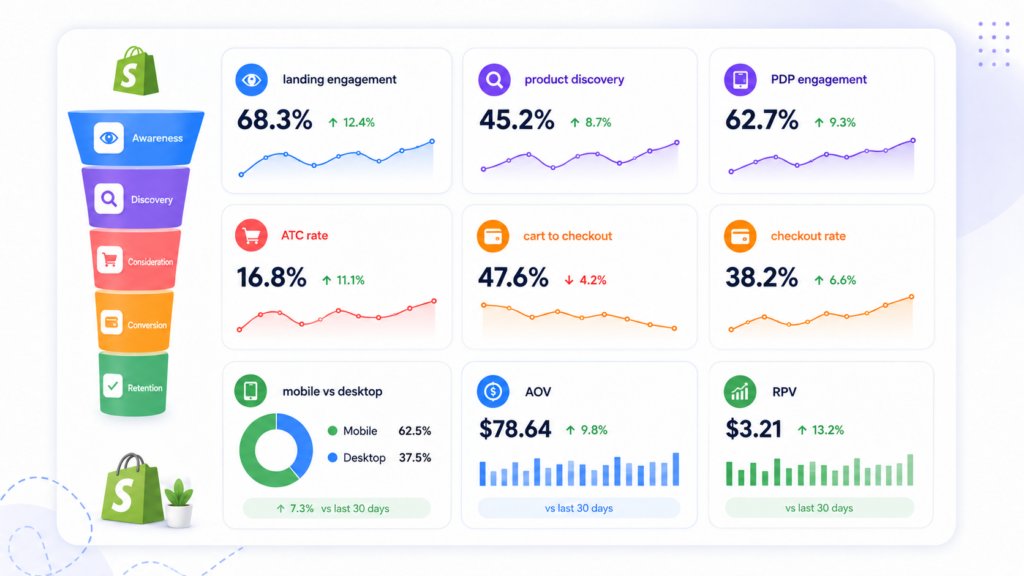
You don’t need to track everything. You need to track the signals that explain where friction appears.
At minimum, monitor:
- Landing page engagement quality – bounce rate, time on page, scroll depth, click‑through to discovery.
- Product discovery engagement – collection views, filter usage, search usage, product card clicks.
- Product page engagement – time on PDP, scroll depth, clicks on key elements, add‑to‑cart.
- Add‑to‑cart rate – by device, source, and key categories.
- Cart‑to‑checkout progression – how many carts start checkout.
- Checkout completion rate – by device and payment method.
- Mobile vs desktop conversion – including differences in AOV.
- AOV and revenue per visitor – by channel and product category.
Tie each metric to a stage in your funnel map. The goal is not to build a fancy dashboard; it’s to have enough clarity to say, “Here’s where friction starts, and here’s where we’re losing the most money.”
Common Funnel Analysis Mistakes on Shopify
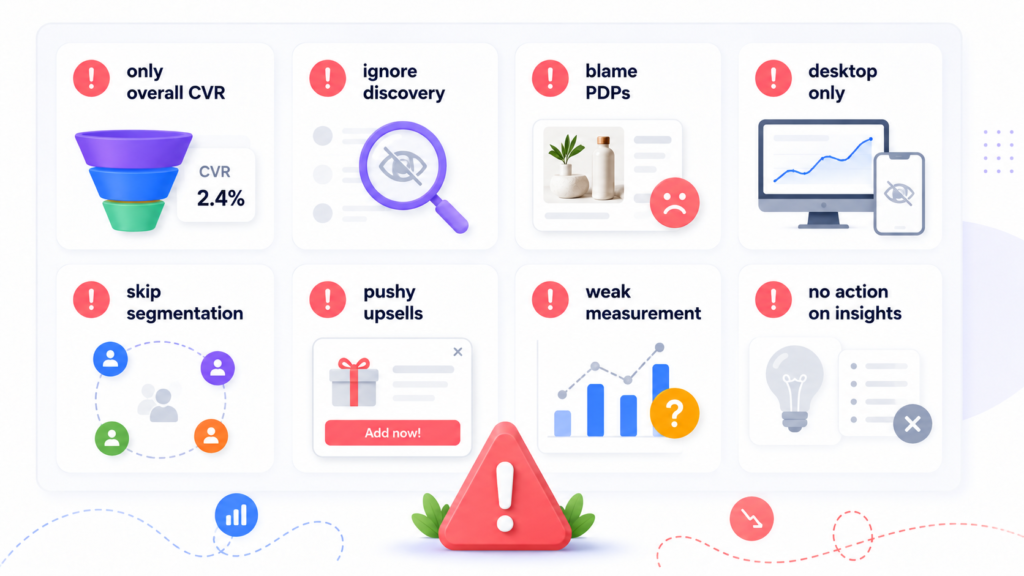
Even experienced teams fall into predictable traps when analyzing funnels. Watch for these:
- Only looking at overall conversion rate. A single number hides stage‑level problems.
- Ignoring product discovery. Brands over‑focus on PDPs and checkout while collections, filters, and navigation quietly leak revenue.
- Blaming PDPs for traffic‑quality issues. If the wrong users land on the wrong pages, no PDP can fix that.
- Treating mobile as the same as desktop. Mobile drop‑off patterns are often different and need separate analysis.
- Over‑optimizing one stage while missing earlier friction. For example, obsessing over checkout tweaks while most users drop off at the collection stage.
- Disruptive AOV tactics. Aggressive upsells and pop‑ups that derail purchase intent instead of supporting it.
- Making decisions from incomplete measurement. Running experiments without proper segmentation or ignoring key metrics like cart‑to‑checkout progression.
Avoiding these mistakes is often the quickest way to make your funnel analysis more useful and your CRO roadmap more grounded.
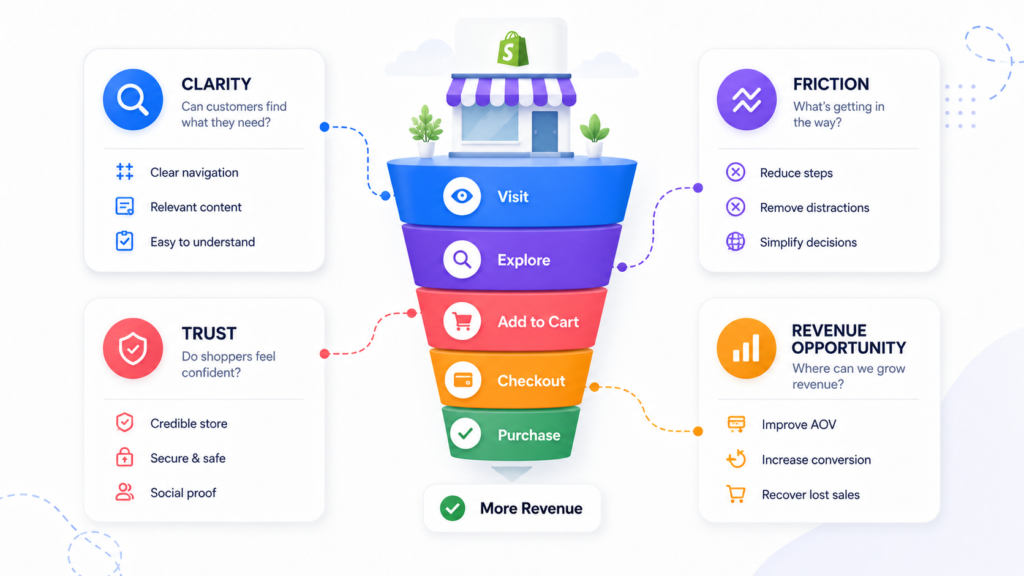
A Simple Framework for Finding Revenue Leaks
To make funnel reviews repeatable, use a simple four‑lens framework for each stage:
- Clarity – Do users understand what they’re seeing and what to do next?
- Friction – Is anything slowing action down unnecessarily (layout, load time, steps, forms)?
- Trust – Do users feel confident enough to continue (brand, product, logistics, payment)?
- Revenue opportunity – Is there a smart way to increase order value without harming conversion?
Walk through each stage of your Shopify conversion funnel with these four questions in mind. You’ll quickly see patterns:
- Stages where clarity is low but friction is also low → messaging problem.
- Stages where clarity is high but friction is high → UX or technical issue.
- Stages with good clarity and friction but low performance → trust or offer issue.
This framework turns a vague “our conversion rate is low” concern into a concrete funnel diagnosis.
Final Thoughts – Analyze the Journey, Not Just the Page
A Shopify funnel analysis is about seeing the full journey, not obsessing over a single template.
When you:
- Map the funnel across traffic, discovery, PDPs, cart, checkout, mobile, trust, and AOV.
- Measure progression between stages instead of staring at one rate.
- Review performance through the lenses of clarity, friction, trust, and revenue opportunity.
…you get a much clearer picture of where your Shopify funnel is leaking revenue and which improvements will actually move the needle.
Instead of reacting to one page or one metric, you can:
- Prioritize fixes that unlock progression for the largest number of users.
- Build a CRO roadmap that connects traffic, UX, merchandising, and analytics.
- Support long‑term growth rather than chasing short‑term “wins”.
If you want experienced partners to help you analyze the journey and turn insights into a practical CRO plan, consider working with a Shopify CRO agency that lives and breathes funnel analysis.